
Detection Engineering Readiness Checklist: Is Your Security Stack Actually Built for It?
A practical detection engineering checklist for security engineers covering data pipelines, built-in detections, detection-as-code, AI triage, and continuous tuning.

Detection engineering sounds straightforward until you're actually doing it: You need clean data, reliable detections, fast triage, and a system that gets smarter over time. Most security teams are stitching all of that together across four or five different tools, and the friction is killing their ability to ship quality detections fast.
This is written for security engineers who own or are building out a detection program, and this checklist covers what a detection engineering program actually needs to function well, and what to look for in the platform you're building it on.
The checklist at a glance
A solid detection and response program doesn’t need to take weeks or even months to build. Below is a checklist we recommend that security engineers follow to build robust, scalable, and effective D&R programs:
- Detection engineering lives in your SIEM, not spread across multiple tools
- Data pipeline handles filtering, transformation, and enrichment without custom code or reliance on a data engineering team
- High-signal, flip-on built-in detections are available for common attack patterns
- Custom detections are defined as code, tested against historical data, and version controlled
- Alerts trigger automatic context gathering and initial triage via AI
- Detection volume and triage patterns feed back into tuning recommendations
The platform question you need to answer first
Before checking anything else off this list: where is your detection engineering happening?
In our opinion, it should be happening in your SIEM, because that's where your data lives. The ideal setup is one platform where you can filter, transform, detect, search, and investigate logs without exporting data somewhere else or waiting on another team. Every handoff is a place where context gets lost and response time slows down.
If you're running your detection logic in a separate tool from your log storage, or your alert triage is happening in a different system than your investigation workflow, that's a structural problem worth fixing before optimizing anything else.
1. Data pipeline and preprocessing
Your raw log data is noisy, inconsistently formatted, and not ready for detection engineering out of the box. Cloud provider logs, SaaS event streams, endpoint telemetry, identity logs: they all look different, and the volume is significant. Before you can write reliable detections, you need to get the data into a usable state.
A solid data pipeline capability lets you:
- Filter and drop events that add volume without adding signal (low-value success events, internal scanner traffic, health checks)
- Transform fields into consistent formats across sources
- Enrich events with context like geolocation, asset ownership, threat intelligence, or user identity data
The goal is to reduce the haystack before you start looking for the needle. If your team is relying on data engineers to write custom pipeline code every time you need a new source or transformation, that's a bottleneck that will consistently slow down your detection program. Look for built-in enrichment capabilities and no-code or low-code pipeline configuration that security engineers can own directly.
What bad looks like: You ingest all of your data into your SIEM with little to no filtering or routing to cold storage. Your SIEM not only contains noisy, unnecessary data, it costs you, literally (most SIEMs charge by data ingested not stored, unlike RunReveal).
What good looks like: You decide what's worth keeping before it hits your SIEM. High-value logs go to hot storage for fast querying and detections. Low-value data gets dropped or routed to cold storage at a fraction of the cost. Enrichments like geolocation, threat intel, and asset context get applied automatically. Security engineers own the pipeline configuration themselves, no data engineering ticket required.
2. Tier 1 and built-in detections
Not every detection needs to be written from scratch. A good SIEM ships with a library of high-signal, pre-built detections covering the most common attack patterns: credential-based attacks, privilege escalation, lateral movement, data exfiltration, and more.
These should be flip-a-switch, no-code-required detections that are tuned to fire on actual threats rather than generate alert noise. The quality bar matters a lot here. A library of 500 detections that produce mostly false positives is worse than 100 detections you can actually trust.
For RunReveal customers, Tier 1 detections are a core part of the platform: a curated set of high-confidence detections you can enable immediately without any configuration work.
Built-in detections handle coverage for common threats, custom detections handle your environment's specifics, and both should coexist in the same system.
What bad looks like: Your SIEM ships with a detection library that's either sparse or so noisy it's borderline useless. You spend the first three months writing detections from scratch to cover basics that should have been there on day one. Or worse, you enable everything in the library and immediately drown in false positives, which trains your team to start ignoring alerts.
What good looks like: You turn on a curated set of high-confidence detections on day one and they actually fire on real threats. The library is maintained, the signal-to-noise ratio is high, and your engineers spend their time writing detections specific to your environment rather than rebuilding commodity coverage.
3. Custom detection validation and testing
When you need to write your own detections, the workflow matters as much as the detection logic. Detections written in an ad-hoc way, stored in a UI, with no version control and no testing process, create technical debt that quietly degrades your security posture.
Detection-as-code solves this. Define your detections as readable, version-controlled code. For most teams, SQL is the right format: it's expressive, widely understood, and lets you query against real data to validate logic before you deploy.
A mature detection engineering workflow includes:
- Syntax linting to catch errors before deployment
- Testing against historical data to validate that your detection would have fired on known-bad events and stayed quiet on benign ones
- Version control so you have a full audit trail of every change, who made it, and why
RunReveal supports detection-as-code for both standard SQL detections and Sigma/streaming detections, with full support for uploading, validating, and managing detections programmatically.
What bad looks like: Your custom detections are not supported in code, or use proprietary formats. This makes it hard for your detections to scale and for team members to be quickly onboarded to your detections. In addition, it also makes testing against historical data a challenge, which means your first real test of a detection is often a live incident.
What good looks like: Custom detections are defined in code, stored in version control, and reviewed before it ships, following a typical software development CI/CD lifecycle. You test new detections against historical data to confirm they would have fired on known-bad events and stayed quiet on benign ones.
4. Automatic triage and context gathering
When an alert fires at 2am, the last thing you want is a raw event with no context. Is this a real threat? Is this the third time this user has triggered this detection this week? Is this IP associated with known malicious infrastructure? Is this asset internet-facing?
Manual context gathering is slow and inconsistent. The modern answer is an AI agent that automatically kicks off an investigation when an alert fires, pulls together the relevant context, and gives the analyst a starting point rather than a blank screen.
Effective auto-triage pulls in:
- Historical activity for the involved user, host, or IP
- Threat intelligence lookups
- Asset context (owner, criticality, exposure)
- Related alerts that may indicate a broader campaign
- An initial assessment of whether this looks like a real threat or a likely false positive
The output should be a structured investigation summary that an analyst can review and act on in minutes rather than starting from scratch every time. This is where AI in security actually delivers value: not replacing analyst judgment, but doing the legible, repeatable context-gathering work so analysts can focus on the decision.
What bad looks like: An alert fires and an analyst opens a ticket with a raw event and a severity label. They spend the next 20 minutes manually searching for context: pulling the user's recent activity, checking whether the IP is known-bad, looking up what the asset does and who owns it. Half the time they run out of time or context and either escalate unnecessarily or close it out and hope for the best.
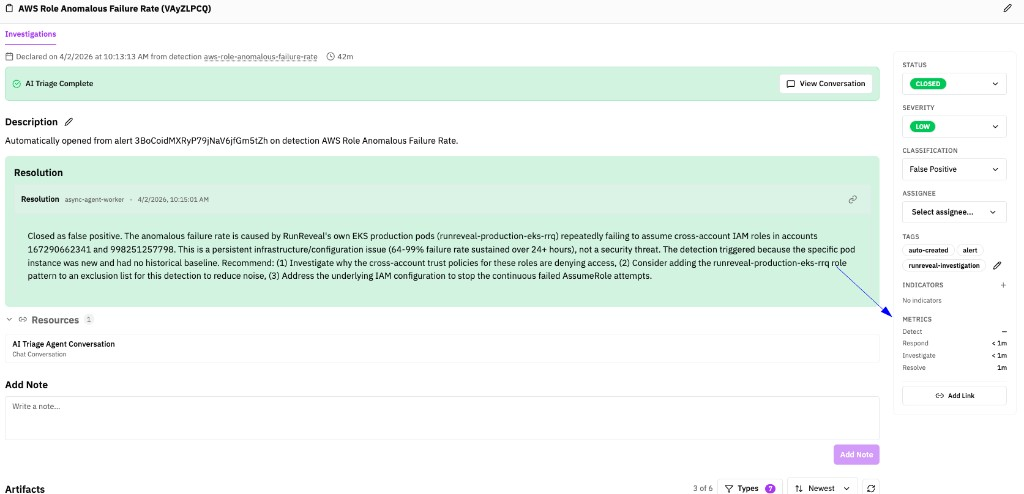
What good looks like: The moment an alert fires, an AI agent starts working. By the time an analyst looks at it, there's already a structured summary: what happened, who was involved, relevant historical activity, threat intel hits, and an initial read on whether this looks like a real threat or a likely false positive. The security team is making a decision, not doing research. Below is an example of an investigation that was automatically triaged and investigated by the RunReveal AI Agent (this example quickly concluded it was a false positive, no action required by the security team).
5. Detection tuning and the AI feedback loop
A detection that fires 200 times a day is not a useful detection. Alert fatigue is very real, and it erodes the trust your team places in your detection program over time. And we all know tuning is not a one-time activity; it's an ongoing part of running a healthy detection program.
Your SIEM and AI agents should help you tune, not leave you figuring it out manually. A good feedback loop looks like:
- Volume tracking so you can see which detections are generating the most noise
- Triage pattern analysis so that when your AI consistently determines a certain type of alert is a false positive, that pattern surfaces as a tuning recommendation
- Suggested rule modifications to tighten conditions, add exclusions, or adjust thresholds
- Closed-loop tracking so you can measure whether tuning changes actually reduced noise without introducing coverage gaps
The goal is a detection program that learns. Your AI agent's triage behavior over time is a signal: if it keeps reaching the same conclusion on the same type of alert, that conclusion should feed back into the detection logic itself.
What bad looks like: One of your detections fires 300 times a week (or even a day!). Everyone on the team knows it's mostly noise, so they've developed a habit of bulk-closing that alert type without looking. That habit eventually extends to other alerts. Alert fatigue sets in quietly, and one day a real threat comes through on a noisy detection and gets closed without investigation.
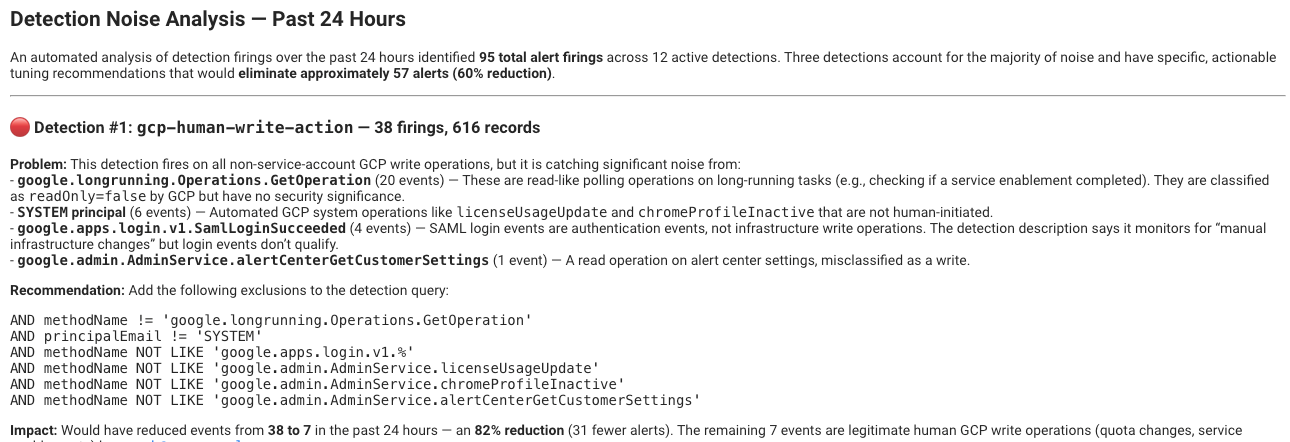
What good looks like: Your platform tracks which detections are generating the most volume and surfaces tuning recommendations based on how your AI agent is actually triaging alerts. When a pattern consistently resolves as a false positive, that pattern feeds back into the detection logic as a suggested exclusion or threshold adjustment. Your detection program gets tighter over time instead of noisier. Below is an example of an email the RunReveal Agent sends to users to recommend suggestions to update noisy detections to be, well, less noisy!
TL;DR If you can check all six boxes from above with a single platform, you're in good shape. If you're stitching together separate tools to cover each one, that's where RunReveal is worth a look.